
With the latest C++ Builder release (13.1), building the latest version of VTK (9.6.2) is now almost straightforward. C++ Builder 13.1 ships with a clang compiler that is of version 20.1.7 (released in early 2025).
Although Embarcadero ships its own version of CMake, the following uses the latest official release of CMake (4.3.4).
The following covers a minimal VTK 9.6.2 build (15 modules) via CMake + Ninja + bcc64x.
Environment
| Item | Value |
|---|---|
| VTK source | VTK 9.6.2 |
| Compiler | bcc64x shipped with C++ Builder 13.1 (clang 20.1.7) |
| CMake | CMake 4.3.4 |
| Generator | Ninja 1.10.2 |
The source code
Use git and check out VTK the repository (see link above). I’m using Tortoise Git and will be checking out the source code into a new branch, based on its tag:
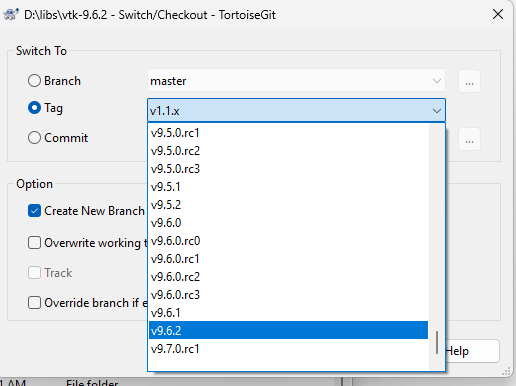
Figure 1: Checking out version 9.6.2 of VTK into folder d:\libs\vtk-9.6.2. Creating a new branch or not is optional.
In order to build VTK with bcc64x the source code will need some minor edits/patches.
Source patches
A fresh VTK 9.6.2 checkout needs four small patches before it builds cleanly with bcc64x. All edits are made so that builds with other compilers, e.g. Microsoft Visual C++ Compiler (MSVC), are unaffected.
In addition to the source changes below, a .def link file is needed at the link stage as the bcc64x compiler have trouble exporting certain templates. The link file is provided below.
Code fix 1: ./Utilities/MetaIO/vtkmetaio/CMakeLists.txt
This fix is straight forward, bcc64x don’t link with Borland library import32.lib, but do link with standard windows libs.
| 142 | endif() | 142 | endif() |
| 143 | 143 | ||
| 144 | if(WIN32) | 144 | if(WIN32) |
| 145 | if(BORLAND) | ||
| 145 | # bcc64x is clang/MinGW, not classic Borland: it has no import32.lib and links | ||
| 146 | # the standard Windows libs from the else() branch instead. | ||
| 147 | if(BORLAND AND NOT CMAKE_BASE_NAME STREQUAL “bcc64x”) | ||
| 146 | target_link_libraries(${METAIO_TARGET} PRIVATE import32) | 148 | target_link_libraries(${METAIO_TARGET} PRIVATE import32) |
| 147 | else() | 149 | else() |
| 148 | target_link_libraries(${METAIO_TARGET} PRIVATE comctl32 wsock32) | 150 | target_link_libraries(${METAIO_TARGET} PRIVATE comctl32 wsock32) |
Listing 1 Skips linking the classic 32-bit Borland import32 CRT import library for bcc64x, falling through to the normal comctl32/wsock32 link.
Code fix 2: ./CMake/patches/99/FindOpenGL.cmake
Same fix as above.
| 131 | 131 | ||
| 132 | if (WIN32) | 132 | if (WIN32) |
| 133 | 133 | ||
| 134 | if(BORLAND) | ||
| 134 | # bcc64x is clang/MinGW (no import32.lib): use the real system opengl32/glu32. | ||
| 135 | if(BORLAND AND NOT CMAKE_BASE_NAME STREQUAL “bcc64x”) | ||
| 135 | set (OPENGL_gl_LIBRARY import32 CACHE STRING “OpenGL library for win32”) | 136 | set (OPENGL_gl_LIBRARY import32 CACHE STRING “OpenGL library for win32”) |
| 136 | set (OPENGL_glu_LIBRARY import32 CACHE STRING “GLU library for win32”) | 137 | set (OPENGL_glu_LIBRARY import32 CACHE STRING “GLU library for win32”) |
| 137 | else() | 138 | else() |
Listing 2 Same import32 problem as above, this time for OpenGL: links the real system opengl32/glu32 instead.
Code fix 3: ./Rendering/OpenGL2/CMakeLists.txt
This fix is related to usage of Windows DirectX. We don’t need it here. If you do, this build may not work for you.
Listing 3 Excludes vtkWin32OpenGLDXRenderWindow.cxx for bcc64x — it pulls in WinRT headers that Embarcadero’s MinGW-flavored SDK does not ship.
Code fix 4: ./Common/Core/CMakeLists.txt
bcc64x have problems exporting some data and function entities. The solution to that problem is an external .def file, wired in via a small guarded addition to Common/Core/CMakeLists.txt
Listing 4 The one line fix: guard the extra link options behind CMAKE_BASE_NAME STREQUAL "bcc64x" and point them at a curated bcc64x_extra_exports.def (1,336 symbols, generated once via dumpbin symbol-diffing — not shown inline, but bundled alongside the patches below).
The extra link file: bcc64x_extra_exports.def
The .def file contain about 1300 mangled symbol names. It need to be present in the ./Common/Core folder at link time.
The build
Building VTK involves 1) a CMake configure step where needed VTK software modules are selected and myriads of options are available, 2) a generate step where build files suitable for a particular compiler/toolchain are generated, 3) a build step where binaries are compiled into runtime code and 4) an install step, where deployable headers and libraries are installed into a dedicated location for consumption.
There are three folders that are important when using CMake, 1) “Source folder”, 2) “Where to build the binaries” and 3) The “CMake Install Prefix”.
- Is where the source code is, in our case, d:\libs\vtk-9.6.2
- Is where cmake configuration files and eventually binaries are built
- Is where the library (binaries, headers and lib files) is to be installed
In our case, 1 is set, 2 is d:\builds\bcc64x\vtk-9.6.2 and 3) is d:\build\bcc64x
Configuring and building
The bash script below will be used to configure and build VTK using CMake. It uses a toolchain file (see below), that will help configure the CMake build using bcc64x. The main tool chain file brings in two other relevant, one that is a CMake platform file and one dedicated to the VTK build.
So, in a bash shell, create your build directory and copy the toolchain files into it.
Copy the .def file into the ./Common/Core folder as it will be needed at link time.
Listing 5 The complete Bash configure-and-build script. It selects 15 modules, builds up the cmake_arguments array pointing CMake at the bcc64x toolchain file, disables the module groups and third-party libraries that don’t build under bcc64x (hdf5, netcdf), supplies the RC compiler path (using the one from Visual Studio install) and the portability compile flags, then runs cmake.
/d/builds/bcc64x/vtk-9.6.2 $
/d/builds/bcc64x/vtk-9.6.2 $
/d/builds/bcc64x/vtk-9.6.2 $
/d/builds/bcc64x/vtk-9.6.2 $ vtk_source_dir=D:/libs/vtk-9.6.2 install_prefix=D:/build/bcc64x ./configure_vtk_for_bcc64x.sh
Listing 6 How to run the configure script in a bash shell.
After the configure phase of CMake, it will take a while, VTK can be built and installed, simply by entering “ninja install” from where the configure script was executed.
Appendix: Toolchain files
The CMake toolchain files are listed below.